
Samsung Radio
Screenshots
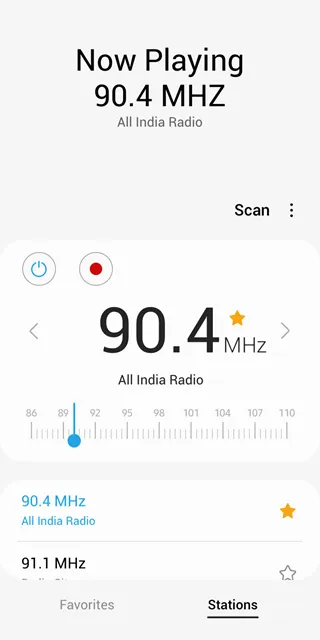
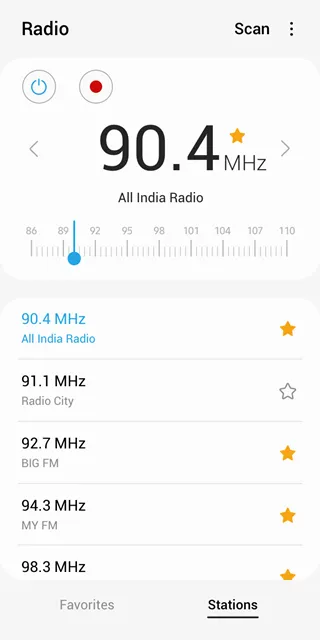
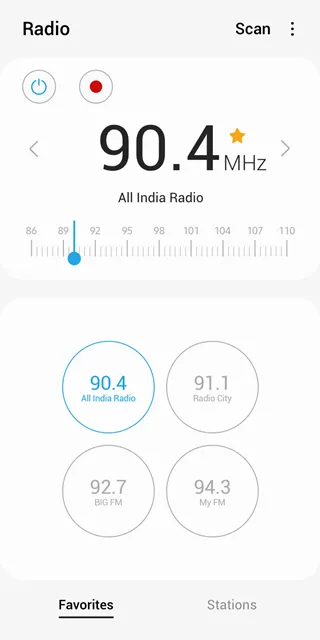
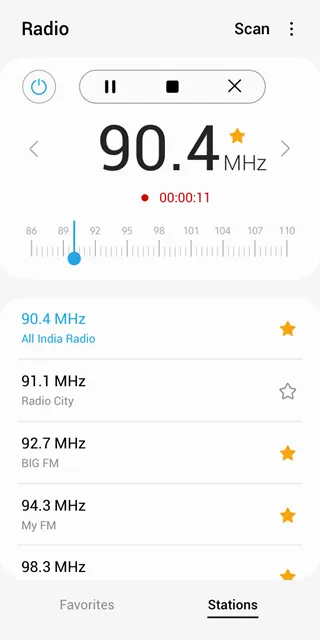
Samsung Radio App For Android offers a classic way to enjoy live local broadcasts without relying on an internet connection. Many people still prefer the reliability of traditional FM waves over streaming services that consume mobile data. This application comes pre-installed on many devices and provides immediate access to news, music, and weather updates. It uses the hardware built into your phone to capture signals from nearby stations. You can listen to your favorite local personalities and stay informed about community events in real time.
The application remains a favorite for users who want a simple and efficient entertainment experience. It features a clean interface that allows you to scan for available frequencies with a single tap. Because it operates through FM hardware, it saves a significant amount of battery life compared to high-resolution streaming apps. You do not have to worry about buffering or signal drops in areas with poor cellular coverage. The software focuses on stability and ease of use for people of all ages. It transforms your modern smartphone into a traditional portable receiver that works whenever you need it.
Access Local FM Stations Without Internet
Samsung Radio allows you to tune into any local FM station within your area. This feature remains incredibly useful during emergencies or when you travel to remote locations. You can stay connected to the world even if your mobile network fails or your data plan runs out. The app detects the signals around you and lists them in a clear order. You simply scroll through the numbers to find the content you enjoy.
The app uses the wires in your headphones as an antenna to capture these signals. This physical connection ensures that you receive the clearest audio possible from local transmitters. You can discover a wide variety of content, including local sports commentary and niche music programs. It keeps you rooted in your local community by providing voices and information that are relevant to your specific city. You get a direct link to the world around you without any monthly subscription fees.
Simple Station Scanning and Management
The design of the software prioritizes quick navigation and organization. You can use the auto-scan feature to find every active station in your current location in seconds. Once the scan finishes, the app saves these frequencies so you do not have to search for them again. This efficiency helps you build a personal library of your favorite broadcasts quickly. You can switch between stations with a simple swipe or a tap on the screen.
- Scan for all available local frequencies automatically.
- Save your favorite stations to a dedicated list for quick access.
- Rename saved stations to identify them more easily.
- Manual tuning options for precise frequency adjustment.
These management tools ensure that your listening experience remains organized. You can create a list of stations for different moods, such as news for the morning and music for the evening. The manual tuning slider allows you to find weak signals that the auto-scan might skip. It gives you total control over how you explore the local airwaves on your device.
High-Quality Audio Through Speakers or Headphones
While the app requires headphones to act as an antenna, you can still choose how you hear the audio. The software includes a toggle that allows you to play the radio through your phone’s built-in speakers. This is perfect for sharing a broadcast with friends or listening while you work in a room. The audio remains crisp and clear because the system optimizes the signal processing for your specific hardware. You enjoy a rich sound profile whether you use earbuds or loud speakers.
The app also supports various audio enhancements depending on your device model. You can often adjust the sound settings to prioritize voices for talk radio or bass for music stations. This level of customization ensures that you get the best possible output from every broadcast. The interface remains responsive even when you switch between different output modes. It provides a flexible listening environment that adapts to your current situation.
Record Your Favorite Broadcasts Instantly
A standout feature of Samsung Radio is the ability to record live content directly to your phone. If you hear a song you love or an interview you want to keep, you can press the record button immediately. The app saves the audio file in a standard format within your device’s internal storage. You can listen to these recordings later even when the radio app is closed. This feature turns your phone into a digital recorder for live airwaves.
- Capture live music and news segments with one tap.
- Save recordings to your local music folder for easy sharing.
- Manage your recorded files within the app interface.
- Record segments without needing an active data connection.
This functionality is excellent for students or researchers who need to capture specific broadcast information. You can build a collection of audio clips from your favorite shows without any extra tools. The recording process does not interrupt the live audio, so you can continue listening as the file saves. It adds a layer of modern utility to the traditional radio experience.
Integrated Sleep Timer and Alarm Features
The application includes a built-in sleep timer to help you fall asleep to your favorite station. You can set the timer for a specific duration, and the app will automatically shut off the radio when the time expires. This prevents your battery from draining overnight and ensures a peaceful sleep. It is a simple but essential tool for those who enjoy background noise while they rest. You can choose intervals ranging from a few minutes to several hours.
Furthermore, many devices allow you to set the radio as your morning alarm. Instead of a standard buzzing sound, you can wake up to the live morning news or your favorite DJ. This creates a more pleasant start to your day and keeps you informed from the moment you wake up. The app manages these transitions smoothly without requiring any complex setup. It integrates your favorite local content into your daily routine.
Minimal Battery and Resource Consumption
Performance remains a key benefit of using a hardware-based radio app. Samsung Radio uses significantly less CPU power than streaming platforms that require constant data processing. This helps your smartphone stay cool even during long listening sessions. You can listen to the radio for hours without seeing a major drop in your battery percentage. It is the most efficient way to enjoy audio content on your mobile device.
The app also has a very small file size, which saves precious storage space on your phone. It does not store large caches of data like typical music applications. This keeps your system running fast and leaves more room for your photos and videos. The software stays updated to ensure compatibility with the latest Android security patches. You get a reliable and lightweight tool that respects your device’s resources.
Final Thoughts
Samsung Radio App For Android is a reliable and essential utility for anyone who values local content and efficiency. It provides a direct connection to FM broadcasts without the need for an internet connection or a data plan. With features like auto-scanning, live recording, and a built-in sleep timer, it offers a complete audio experience. The simple interface makes it accessible to everyone, while the low battery consumption ensures you can listen all day long. By using your headphones as an antenna, it delivers clear sound for news, music, and emergency updates. This application proves that traditional technology still has a vital place in our modern digital lives. It transforms your smartphone into a versatile receiver that keeps you connected to your community wherever you go.